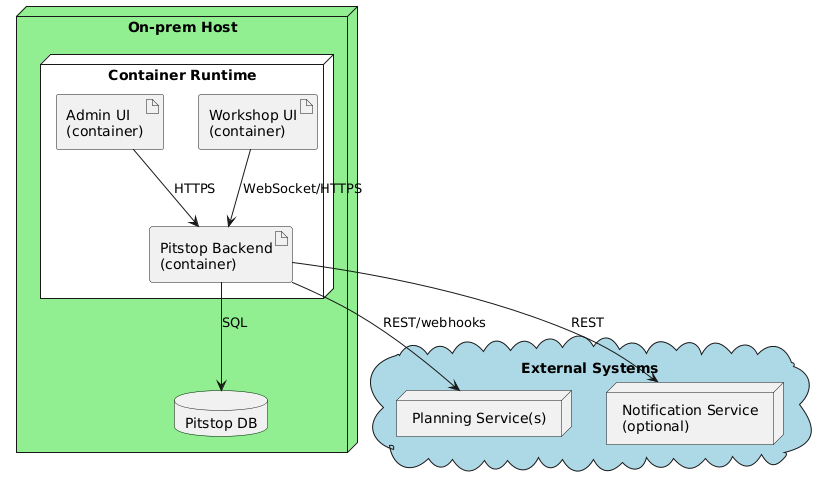
This post is about chapter 7: Deployment view, the last chapter in the "How is it built and how does it run" group. Chapter 7 answers: where do your building blocks run, in which environments, and with which settings? This chapter turns "it works on my machine" from tribal knowledge into shared documentation. No more guessing which settings matter or where things actually run.
This post is about chapter 7: Deployment view,
the last chapter in the “How is it built and how does it run” group.
Small milestone: chapter 7 means we are past the halfway point of the 12 arc42 chapters.
Chapter 5 gave us the map (building blocks).
Chapter 6 showed how those blocks collaborate at runtime.
Chapter 7 answers the next question: where do those blocks run, in which environments, and with which settings?
Note
This chapter turns “it works on my machine” from tribal knowledge into shared documentation.
No more guessing which settings matter or where things actually run.
Also: “my machine” can be a perfectly valid environment.
If onboarding and local dev matter, document that setup as a real deployment variant.
What belongs in chapter 7 (and what does not)
The main job of chapter 7 of an arc42 document is to answer:
Where does the system run, how is it wired, and what needs to be configured to make it behave correctly?
What belongs here:
A deployment overview of nodes, environments, and their connections.
Think: hosts, clusters, networks, segments, and the paths between them.
A mapping from building blocks to infrastructure:
which blocks run where, and which ones are “shared” vs “per environment/per site”.
The runtime configuration that is required to run the system and that changes behavior:
environment variables, config files, feature flags, connection strings, default values, and required secrets (at least at a reference level).
Operational concerns that affect how the system holds up:
what scales, what is isolated, what happens when a node goes down.
Trust boundaries and data classification:
which networks are public vs. private, and where sensitive data is allowed to live.
Persistence strategy:
especially for containerized setups, explicitly state where state lives (volumes, managed databases) and if it is backed up.
Quality and/or performance features of the infrastructure when they matter:
expected throughput, latency constraints, availability targets, bandwidth limitations, or time synchronization (NTP) requirements.
Links to deployment assets when they are the source of truth:
Dockerfiles, Helm charts, Kustomize overlays, Terraform/Bicep/ARM, compose files, install scripts, etc.
If your base image choice matters (for size, security, or compliance), add a short note on why.
Tip
If you have full Infrastructure as Code (IaC), Chapter 7 is the map; your Terraform or Bicep is the construction crew.
Do not duplicate every setting from your IaC here. Instead, explain the topology that the code creates.
What does not belong here:
A full re-explanation of your building blocks or domain responsibilities.
This chapter is about placement and wiring, not reintroducing the system.
Detailed runtime scenarios (“and then it calls X”) unless the scenario is specifically about deployment behavior
(e.g., failover sequence, blue-green switch, cold start, disaster recovery).
Interface payload catalogs and protocol specs.
Link to where contracts live, and keep chapter 7 focused on infrastructure and configuration.
A giant unstructured dump of “every setting we ever had” without context.
Configuration belongs here, but it needs a structure: defaults, required vs optional, and what it influences.
Where to document configuration
Note
Strictly speaking, arc42 does not prescribe a configuration section in chapter 7.
The template typically places the what of a setting (meaning, default, contract) in chapter 5 (building block interfaces)
and the how (override strategy, config patterns) in chapter 8 (crosscutting concepts).
Chapter 7 itself only covers the where: which node, which manifest, which secret store.
I prefer to consolidate configuration in chapter 7.
When a newcomer asks “what do I need to configure to make this run?”,
I want the answer to be in one place, right next to the infrastructure it runs on.
Splitting it across chapters 5, 7, and 8 is structurally clean but practically hard to navigate.
If you have a separate place where configuration is documented (runbook, ops handbook, generated config reference),
link to it and keep chapter 7 as the map.
If you do not have a separate configuration reference, chapter 7 is a practical home for it:
everything needed to make the application run, and everything that changes behavior per environment.
That usually includes:
environment variables and configuration keys
config files and naming conventions (appsettings.{Environment}.json, .env, mounted files, etc.)
default values
“required in production” vs “optional”
where it is set (deployment manifest, secret store, CI variables)
what it impacts (behavior, performance, safety, compliance)
Warning
Never document actual secret values (API keys, passwords, connection strings) in this chapter.
Only document the names of the secrets or which vault they live in.
If I see a potential password in a markdown file, I will find you! 👮♂️😉
A practical structure that stays readable:
a short “configuration model” section (how config is loaded/overridden)
a table of key settings (only the ones that matter)
links to the “full reference” if/when you have one
The minimum viable version
If you are short on time, aim for this:
One main deployment diagram for the most important environment (often production-like).
A short mapping table: which building blocks run where.
A small “runtime configuration” section:
the 5–15 settings that decide behavior, plus where they live.
That is already enough to stop most “but it worked yesterday” surprises.
Copy/paste structure (Markdown skeleton)
Sections 7.1 and 7.2 follow arc42’s infrastructure levels.
I add a dedicated configuration section per infrastructure element;
arc42 would split that across chapters 5 and 8 (see the note above).
For multiple environments, arc42 suggests copying the 7.1 structure.
Keep it small and add depth only when it matters.
Pitstop is my small demo system for this series.
It is intentionally simple, so the documentation stays shareable.
This is what chapter 7 looks like when filled in.
7. Deployment view
7.1 Infrastructure Level 1 - Single garage
Situation: one garage runs Pitstop on-prem on a single Docker host;
the UIs and backend run as containers next to the database.
Motivation
Small garages need a self-contained setup that works on a single machine
without external dependencies. All components share one host to keep
operations simple.
Mapping
Building block
Runs on
Notes
Workshop Management Service
Docker container
Main backend
Customer Management Service
Docker container
Shares host with backend
Pitstop UI
Docker container
Served via reverse proxy
SQL Database
Docker container
Persistent volume on host
Message Broker
Docker container
RabbitMQ, single node
7.1 Infrastructure Level 1 - Multi-site
Situation: a garage chain wants central reporting and audit,
but each site needs fast workshop responsiveness even with shaky connectivity.
Central DB + audit store; site-level caches for workshop responsiveness.
Reporting can run off read replicas.
Motivation
Garage chains need central reporting and audit, but the workshop still
needs to feel fast locally. Sites must keep working even when
connectivity to the central system is unreliable.
Security: network segmentation; outbound allowlist to planning/PSP endpoints.
7.2 Infrastructure Level 2
7.2.1 Docker host
Single Linux host running Docker Engine.
All Pitstop containers and the database run here.
Images are built with multi-stage Dockerfiles to keep the final image small and free of build tooling.
Configuration
Pitstop behavior differs per garage and network reliability.
These settings are owned by Ops and injected via container environment variables
or mounted config files.
Key setting: ConnectivityMode
OnlineFirst (default): normal operation, real-time updates preferred
container env var Pitstop__ConnectivityMode or appsettings.{Environment}.json
appsettings.Production.json
{
"Pitstop": {
"ConnectivityMode": "OfflineFirst",
"Realtime": {
"Transport": "WebSocket",
"FallbackToPollingSeconds": 5
},
"Sync": {
"RetryPolicy": "ExponentialBackoff",
"MaxRetries": 10
}
}
}
To browse the full Pitstop arc42 sample, see my GitHub Gist.
Common mistakes I see (and made myself)
Only drawing “prod” and ignoring “dev”
If local dev and onboarding matter, treat them as a real deployment variant.
It does not have to be pretty, it has to be accurate.
Mixing behavior and placement
Chapter 7 is where things run and how they connect.
Behavior generally belongs in runtime scenarios (chapter 6).
Deployment-driven behavior (failover, DR, scaling) should be documented either here (when it depends on topology/environment) or in chapter 8 (when it is a reusable concept/pattern).
Configuration without structure
A thousand keys in a wall of text is not documentation, it is punishment.
Group by domain/feature, document defaults, and call out which values change behavior.
Forgetting operational boundaries
Who owns what? Which node is “managed by ops” vs “managed by the team”?
Which dependencies are inside your control, which are not?
No traceability to building blocks
If readers cannot map a box in the diagram back to a building block from chapter 5,
the deployment view becomes “a nice picture” instead of a useful model.
Done-when checklist
🔲 The main environments/variants are described (or explicitly out of scope). 🔲 Building blocks are mapped to nodes/locations. 🔲 Key runtime configuration is documented: defaults, where set, and what it changes. 🔲 Operational concerns are at least acknowledged (monitoring, backups, security boundaries). 🔲 A newcomer can answer: “where does this run?” and “what do I need to configure?”
Next improvements backlog
Add an explicit mapping table for each relevant environment or variant.
Link the actual deployment assets (Dockerfile, Helm, Terraform, compose) where appropriate.
Add a small “secrets and trust boundaries” note (what must be protected, where it lives).
Add operational SLO/SLA expectations if availability and latency are key goals.
Wrap-up
Chapter 7 is the reality check: the system, placed on real infrastructure with real constraints.
It is where “works in my head” becomes “works in an environment”.
With chapter 7 done, the full “How is it built and how does it run” group is complete.
Next up is the “Reusables, decisions, and qualities” group, starting with arc42 chapter 8, “Concepts”,
where we document the reusable cross-cutting ideas (auth, logging, error handling) without duplicating them in every scenario.