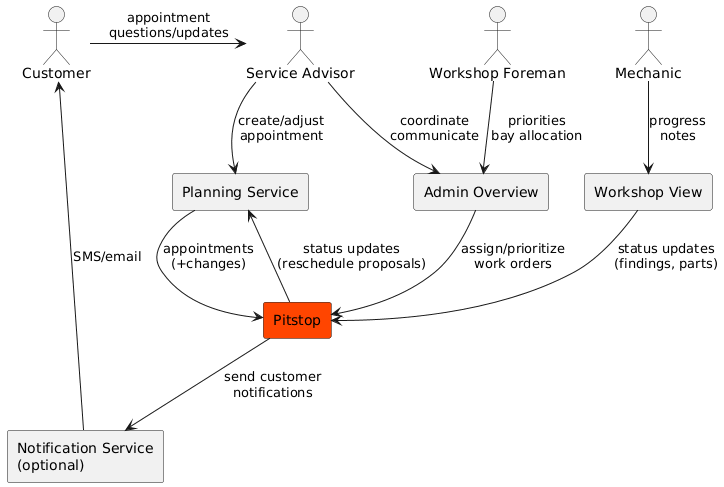
Chapter 3 draws the boundary of your system. If it is unclear what is inside and outside, integrations and expectations will break first.
In this article I show what belongs in chapter 3, what to keep out, and a minimal structure you can copy, plus a small example from Pitstop.
Technical design details that do not cross the boundary.
Note
If there is no separate API documentation, chapter 3 is the place to document your interfaces.
Even when you can link to OpenAPI or AsyncAPI documents, include 1–2 small sample payloads here.
It makes the integration real and readable without forcing people to open a separate spec.
Diagrams: modeling tool or text-based
Diagrams make chapter 3 click.
You can draw them in a modeling tool like Sparx Enterprise Architect,
but you can also keep them close to the code using text-based diagrams.
I prefer PlantUML component diagrams for this chapter, because the system boundary and interfaces are easy to read.
Text-based diagrams work well because they are easy to diff, review, and version together with the documentation.
Tip
Use whatever keeps the diagram maintained.
A perfect diagram that nobody updates is less useful than a simple one that stays correct.
The minimum viable version
If you are short on time, aim for this:
One business context diagram (or a table) listing the key actors/systems and what they exchange.
One technical context diagram (or a table) listing the top interfaces with direction and protocol.
For the top 1–3 interfaces: add a short example (sample payload, file format snippet, or message shape).
That is enough to prevent most boundary and integration surprises.
When this chapter becomes high value
As soon as you have quality goals around availability, latency, or operational continuity,
your interfaces need a bit more than we call API X.
For your top interfaces, add:
SLA/SLO expectations and support windows
Failure behavior and fallback procedures
Retry/idempotency rules
Rate limits and quotas
Security and trust boundaries
This is often where the conversation moves from it depends to concrete trade-offs.
Pitstop is my small demo system for this series.
It is intentionally simple, so the documentation stays shareable.
This is what chapter 3 looks like when filled in.
3. Context and scope
3.1 Business context
Pitstop sits between planning and the workshop.
It keeps work orders and status in sync so people stop copying information between tools.
Actor/System
Responsibility
Exchanges with Pitstop
Customer
Brings car, receives updates
ETA updates (via advisor/portal)
Service Advisor
Manages appointment & expectations
Priority changes, notes, customer communication
Workshop Foreman
Orchestrates execution
Assignments, reprioritization
Mechanic
Performs work
Status updates, findings, time spent
Planning Service
Owns schedule/time slots
Appointment import, reschedule suggestions
Notification Service (optional)
Contact customers
SMS/email updates
3.2 Technical context
Peer
Interface
Owner
Direction
Protocol/Format
Notes
Planning Service
Appointments API
Planning vendor
Inbound
REST/JSON
Full import + incremental sync
Planning Service (optional)
Webhooks
Planning vendor
Inbound
HTTP/JSON
Push appointment changes
Planning Service
Status updates
Pitstop team
Outbound
REST/JSON
Delay, ready, reschedule proposal
Admin Overview UI
Work Orders API
Pitstop team
Bidirectional
HTTPS/JSON
RBAC, dashboards
Workshop View UI
Live Updates
Pitstop team
Bidirectional
WebSocket/JSON
Low latency, optimized payloads
Notification Service (optional)
Notifications API
Pitstop team
Outbound
REST/JSON
Customer updates
3.2.1 Interface: Appointments API
3.2.1.1 Examples
Appointment imported from planning:
{
"appointmentId": "A-10293",
"plate": "12-AB-34",
"start": "2026-01-12T09:00:00+01:00",
"service": "OilChange",
"customerRef": "C-4451"
}
3.2.2 Interface: Work Orders API
3.2.2.1 Examples
Workshop update from a mechanic:
{
"workOrderId": "WO-7781",
"status": "WaitingForParts",
"note": "Brake pads not in stock",
"updatedBy": "mechanic-17",
"updatedAt": "2026-01-12T10:41:00+01:00"
}
To browse the full Pitstop arc42 sample, see my GitHub Gist.
Note
Interfaces are not always APIs.
Manual exports, emailed files, spreadsheets, SFTP drops, and someone retypes it are also integrations.
If information crosses the boundary, document it here.
Common mistakes I see (and made myself)
Only naming neighbors, without exchanges
A box called CRM is not useful by itself.
Document what is exchanged and why.
Mixing business and technical context
Business context is about responsibilities and value.
Technical context is about protocols and integration mechanics.
Mixing them makes both harder to read.
Treating REST as the only interface
REST is common, but not universal.
File transfers, messaging, batch jobs, manual steps and spreadsheets all matter.
No ownership
If you do not document who owns an external interface, you will not know who to call when it breaks.
No direction We integrate with X is vague.
Who initiates, who is the source of truth, who is allowed to change state?
No examples
Even when you have OpenAPI or AsyncAPI, one small payload example prevents a lot of misunderstandings.
No expectations for critical interfaces
If availability or latency matters, document assumptions:
SLAs, failure behavior, retry rules, and fallback procedures.
Note
If an external stakeholder cannot recognize their responsibilities and expectations in this chapter,
the integration is not documented clearly enough yet.
Done-when checklist
🔲 The system boundary is clear (inside vs outside). 🔲 Business actors and neighboring systems are listed with responsibilities. 🔲 The top interfaces are listed with direction, protocol/format, and owner. 🔲 The most important integrations have 1–3 small examples (payload, file snippet, message shape). 🔲 Critical interfaces have expectations (SLA/failure behavior) or are explicitly marked as unknown.
Next improvements backlog
Add links to OpenAPI/AsyncAPI documents (or create them if missing).
Add SLA/SLO and failure behavior for the top 3 interfaces.
Add a short note about trust boundaries and data classification (if relevant).
Add examples for non-API integrations (file drop, manual export, batch job) if they exist.
Review chapter 3 with external stakeholders (planning vendor/team, ops, security) for recognition and correctness.
Wrap-up
Chapter 3 is where you make expectations explicit.
Most problems show up at the boundary first, so investing in this chapter pays off quickly.
This concludes the “Why and where” group of arc42 chapters.
Next, we move on to the “How is it built and how does it run” group.