With the launch of Visual Studio 2010 this week a lot of people will start upgrading to the new version. After the installation was complete, I noticed the Surface project and item templates were not available.
In this article I explain how to get the entries in Visual Studio 2010.
First of all, you need to realize that the templates are part of the Microsoft Surface SDK. If you have it installed, skip the next paragraph.
Installing the Surface SDK
Note
If you are running Windows 7 or a Windows Vista x64, you need to apply the changes described in a previous post:
“Installing the Microsoft Surface SDK on Windows 7 x64”.
If you do not have Visual Studio 2008 on your system and want to start with Visual Studio 2010 from scratch some additional steps are needed patching the Surface SDK Installer.
For details on the patch process see the earlier referenced post.
Patching the installer
When you’re patching the MSI with the Orca tool remove also the following conditions:
- Select the row with
Installed OR (VS2008SPLEVEL AND VS2008CSPROJSUPPORT) OR VCSEXP2008SPLEVEL
and choose Drop row - Select the row with
Installed OR (VS2008SPLEVEL AND VS2008SPLEVEL >= "#0") OR(VCSEXP2008SPLEVEL AND VCSEXP2008SPLEVEL >= "#0")
and choose Drop row - Select the row with
Installed OR DEXPLORE
and choose Drop row - Select the row with
Installed OR VS90DEVENV OR NOT VS2008SPLEVEL
and choose Drop row - Select the row with
Installed OR VCSHARP90EXPRESS OR NOT VCSEXP2008SPLEVEL
and choose Drop row
Copying the Templates from the SDK
Now that you have installed the Surface SDK the subsequent steps are quite simple.
The following lines are for x64 systems.
If you are running on x86 change Program Files (x86) into Program Files.
xcopy /s "C:\Program Files (x86)\Microsoft Visual Studio 9.0\Common7\IDE\ItemTemplates\CSharp\Surface\v1.0" "C:\Program Files (x86)\Microsoft Visual Studio 10.0\Common7\IDE\ItemTemplates\CSharp\Surface\1033"
xcopy /s "C:\Program Files (x86)\Microsoft Visual Studio 9.0\Common7\IDE\ProjectTemplates\CSharp\Surface\v1.0" "C:\Program Files (x86)\Microsoft Visual Studio 10.0\Common7\IDE\ProjectTemplates\CSharp\Surface\1033"
cd "C:\Program Files (x86)\Microsoft Visual Studio 10.0\Common7\IDE"
devenv /setup
After this is finished launch Visual Studio 2010.
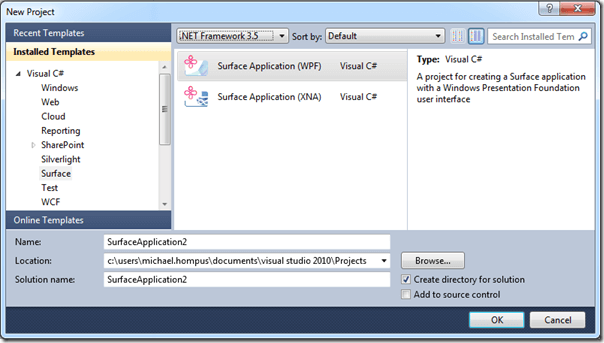 (Remember to select .NET Framework 3.5)
